The Pomodoro technique: how to focus in 25-minute rounds
Work in short timed rounds with a break after each, on one task at a time. Where the technique comes from, what research says about breaks, and how to run it.
The Pomodoro technique splits work into short rounds. You pick one task, set a timer, work on that task until the timer rings, then take a short break. After a few rounds you take a longer one. Each round is called a pomodoro.
Where it comes from
Francesco Cirillo developed it in the 1980s as a university student, using a tomato-shaped kitchen timer to push himself to focus for short stretches. Pomodoro is the Italian word for tomato. His own site describes the technique in three parts: plan the work and estimate it realistically, focus on one activity at a time with regular breaks, and reflect by comparing your estimates with what happened.
The classic rhythm is 25 minutes of work and a 5-minute break, and after four pomodoros a longer break of 15 to 30 minutes. The length is Cirillo's choice. No study shows that 25 is the right number.
Why it works
A short, fixed round lowers the bar to start. Procrastination research points to the task itself: in a 2007 meta-analysis of 691 correlations, Piers Steel found that task aversiveness was one of the strong and consistent predictors of putting things off (Psychological Bulletin). The reasoning for the technique follows from that. "Work on the report" is a big, vague thing to face. "Work on the report until the bell, then stop" is smaller, and it is easier to start something you are allowed to stop.
Brief breaks help you stay with a long task. In a 2011 experiment by Atsunori Ariga and Alejandro Lleras, 84 people did a repetitive computer task for 50 minutes. Most got worse over time. The group that briefly switched to a different task twice did not decline (University of Illinois summary). Those diversions were another task, not rest, and the study says nothing about 25 minutes.
Breaks refresh you, with limits. A 2022 meta-analysis of micro-breaks, short pauses of up to 10 minutes, by Patricia Albulescu and colleagues covered 22 samples and 2,335 people (PLOS ONE). Breaks gave a small boost to vigor (d = .36) and a small cut in fatigue (d = .35). The overall effect on performance was not significant, and it showed up mainly for tasks that were not very demanding. Longer breaks helped performance more.
So the technique has support for its two main ideas, starting small and pausing, and none for its exact numbers. Treat 25 and 5 as a starting point.
How to run it
- Choose one task. Say what finished means for this round: "draft the introduction", not "work on the report".
- Set the timer for 25 minutes and work on that task only.
- Write down interruptions instead of acting on them. A new idea or a request goes on a scrap of paper. You deal with it after the round.
- When the timer rings, stop and take 5 minutes. Stand up, drink water, look away from the screen.
- After four rounds, take a longer break, 15 to 30 minutes.
- At the end of the day, count. How many rounds did the task take? Use that count next time you estimate.
Say you guess that a report needs six rounds, and it takes nine. The count tells you to plan nine next time, or to find out why it ran over.
Mistakes to avoid
- Skipping the breaks. The rest is part of the method.
- Starting without a chosen task. The first minutes go on deciding.
- Using the break to check messages. A new thread in your head follows you back to the task. Time blocking explains why.
- Stretching a round to finish a thought. Stop, note where you were, and pick it up next round.
- Treating the count as a score. Rounds measure effort. They do not measure whether the work was good.
When it is the wrong tool
- For work that needs long unbroken stretches. If a bell breaks you out of deep concentration, use longer rounds or none. Some people prefer 50 minutes of work and 10 of rest.
- For meetings and collaboration. Other people do not stop at 25.
- For very small tasks. Batch them and clear them in one round.
- When the problem is not focus. If the task is unclear, no timer fixes it. Work out the next step first.
In Prior
The Focus page is a Pomodoro timer built around one task. It is free on every plan.
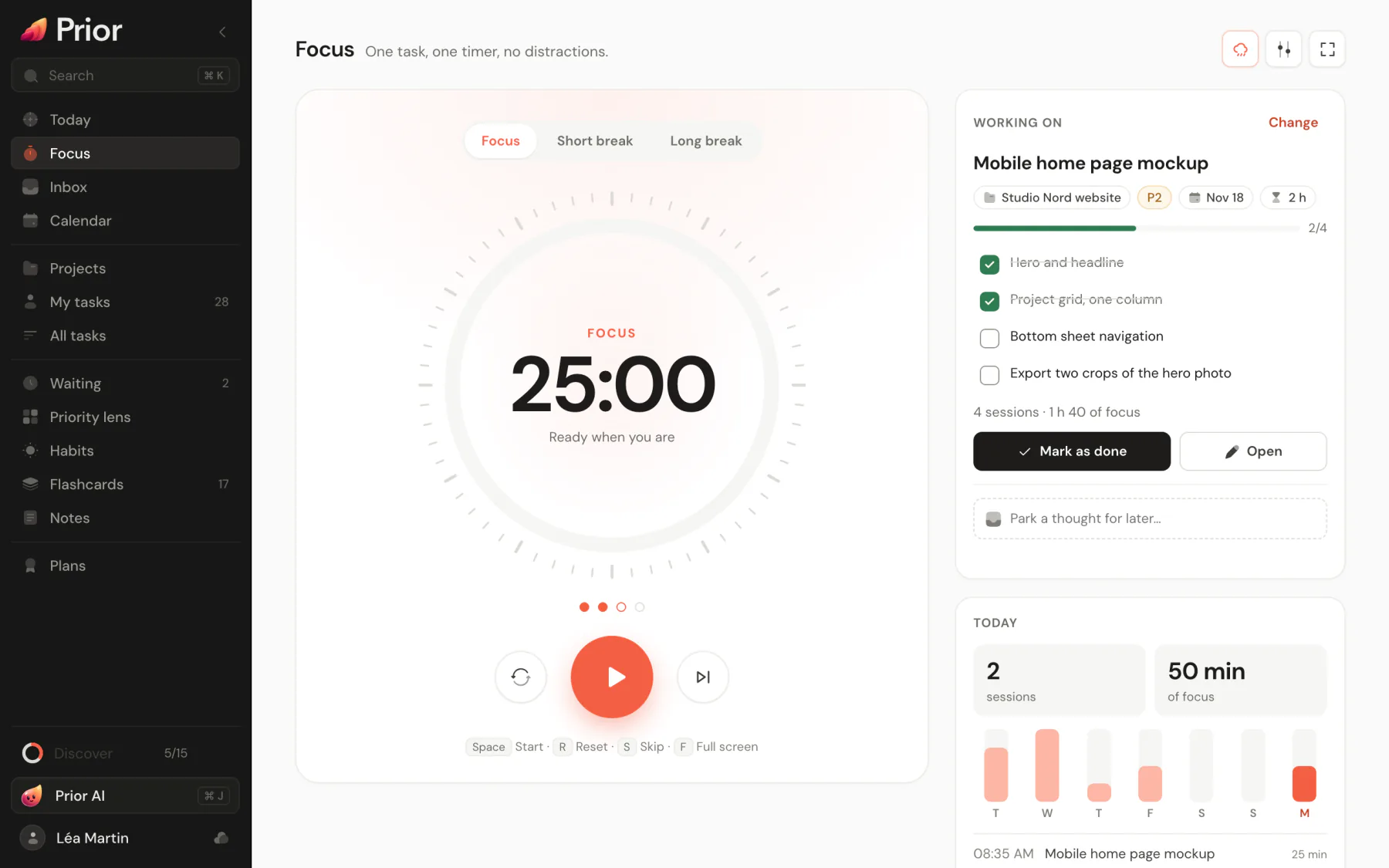
Open Focus in the sidebar, or press G then F. If it is missing from your sidebar, turn it on in Settings → General → Navigation.
- Pick the task. Pick a task opens a searchable list that starts with Recommended tasks. A task's menu also has Focus on this task, which picks it and opens the page. You can run a free session with no task.
- Start. The phases are Focus, Short break and Long break. The default is 25 minutes and 5 minutes with a 15-minute long break every 4 sessions. In Timer settings you can choose Classic (25/5), Deep work (50/10) or Sprint (15/3), change every duration, and turn on Chain sessions so the next phase starts by itself.
- Keys. Space starts and pauses, R resets, S skips and F goes full screen. Skipping a focus phase does not count it.
- Capture a distraction. Type the thought in the field under the timer. Prior saves it as a task with the Inbox status and leaves the timer running.
- During the round. The task card shows the checklist, so you can tick steps off, and Mark as done completes the task.
- Sound and screen. A chime (you can turn it off) and a notification mark the end of each phase. On Android the end of a phase is scheduled as an alarm notification, so it reaches you with the phone locked. Ambient sound plays brown noise, pink noise, rain or café sound, generated on your device. Keep the screen on holds the screen awake during focus phases where the device allows it.
- The count. The page shows today's sessions and minutes and a chart of the last seven days. Those minutes also appear in your weekly review.
The timer belongs to the device you start it on. Today shows a small version of it with the live countdown. See Focus timer and Ambient sounds for all the options. To give each round a place in the day, combine it with time blocking.