Run a focus session
Work on one task with a Pomodoro timer that follows you around the app, keeps count of your sessions and shows how much you focused today.
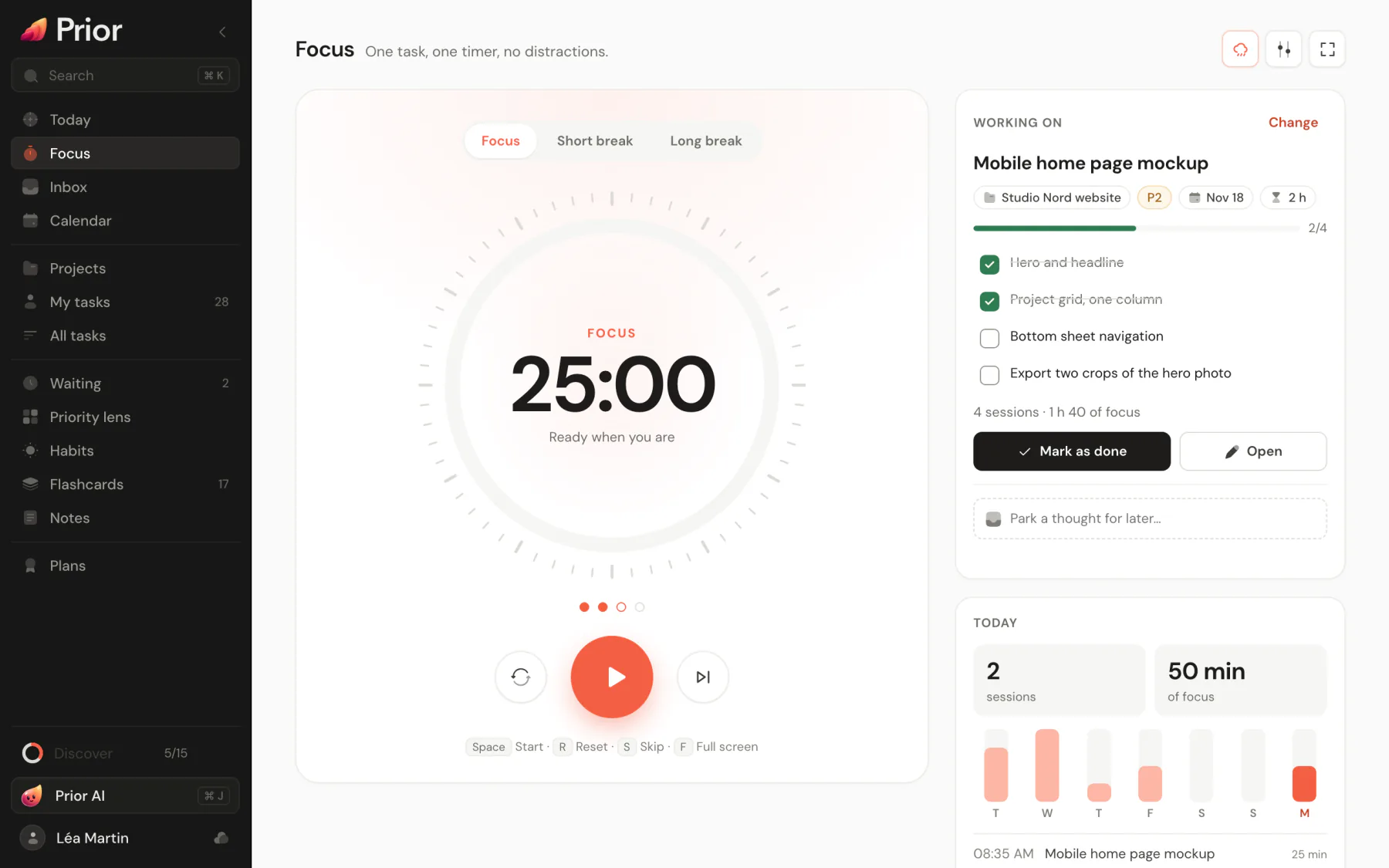
The Focus page is a Pomodoro timer built around one task: work for a set time, rest, repeat. Open it from the sidebar, with G then F, or by searching Start a focus session in the command palette. If Focus is missing from your sidebar, turn it on in Settings → General → Navigation.
A cycle
The timer has three phases: Focus, Short break and Long break. By default a focus session lasts 25 minutes and a short break 5. After 4 focus sessions, a long break of 15 minutes replaces the short one. The dots under the dial show how many sessions you have done before the next long break.
Start
- In the Pick a task card, press one of the suggested tasks: they come from today's picks and your top-ranked tasks. Press All tasks to search every open task, or to choose No task for a free session.
- Press Start. The dial counts down and shows when the phase ends.
- When the phase ends, Prior plays a soft chime, sends a notification if you allowed them, and shows the countdown in the window title. The next phase waits for you, unless Chain sessions is on.
You can also click a phase to switch to it by hand. Pause stops the clock, Reset restores the full length and Skip moves to the next phase. Skipping a focus session does not count it.
| Key | Action |
|---|---|
| Space | Start or pause |
| R | Reset |
| S | Skip |
| F | Full screen. Esc leaves it. |
Work on the task
The Working on card shows your task's checklist: tick steps off there. Mark as done finishes the task, Open shows it and Change picks another. The card also counts the sessions and the time you have already spent on it.
Type in Park a thought for later… when a distraction pops up. It is saved to your Inbox, and the timer keeps running.
See your focus
The Today card gives sessions and minutes so far, a bar chart of the last seven days and the latest sessions of the day. Prior keeps your finished sessions for two months. Prior Wrapped and the weekly review read them.
Settings
Press the sliders button to open Timer settings:
- Classic (25 / 5), Deep work (50 / 10) and Sprint (15 / 3), or your own lengths: focus from 5 to 120 minutes, short break from 1 to 30, long break from 5 to 60, and a long break every 2 to 8 sessions.
- Chain sessions starts the next phase by itself.
- Chime plays the sound at the end of a phase.
- Keep the screen on holds the screen awake while a focus session runs, where your device allows it.
- Ambient sound.
Good to know
- One timer runs for the whole app. Leave the page, and it keeps going: Today shows a small card with the countdown and a play button.
- On Android, the end of a phase rings even with the phone locked.
- The timer and its history stay on the device where you run them.
Updated 5 November 2026